
When it comes to handheld gaming PCs (no, I refuse to call them consoles when they have Windows installed), having a touchpad and a built-in kickstand are among the key criteria I look for. After considering various options, including the many models we have reviewed, I eventually decided to settle on the 2023 Lenovo Legion Go as my personal unit.
Other factors that swayed my decision included its then-superior AMD Ryzen Z1 Extreme chipset, commendable battery capacity and generous 8.8-inch display. Meanwhile, the handheld’s removable controllers were a nice bonus. With the right controller, they can even double as a mouse, and I do find myself making use of that feature whenever I’m in a pinch.

The Lenovo Legion Go 2, the current-generation model and the subject of this review, naturally builds on what its predecessor offered. Improvements have been made to its performance, battery life and design, although there is one slight yet arguably significant downgrade to be found.
Nevertheless, the newer model has quickly become my go-to portable gaming machine, replacing the original Legion Go in the process. Now, almost a year on and with no successor in sight, does it still hold up? More importantly, with the ongoing memory shortage and Lenovo’s unfortunate price hike, is it still worth picking up for your on-the-go PC gaming needs?
What Am I Looking At?
Since it’s been a while, let’s recap. The Lenovo Legion Go 2 packs a more powerful Ryzen Z2 Extreme chipset with Radeon 780M graphics and a larger battery, along with a shorter profile and better ergonomics.
Its display, on the other hand, has seen a downgrade in terms of resolution, where it is now offered at only 1920 x 1200px instead of 2560 x 1600px found on its predecessor. On the flip side, the touchscreen now sports a much better OLED panel rather than IPS. Refresh rate still holds at 144Hz at maximum, but new to the Legion Go 2 is support for VRR (variable refresh rate).
Other than the above, all of the best quirks from its predecessor make a return here. Most notable being the detachable controllers, built-in kickstand, hall-effect thumbsticks, right touchpad, top and bottom USB-C ports, microSD card slot, and a 3.5mm headphone jack.


What’s Good About It?
A More Comfortable Handheld
One of the biggest improvements with the Legion Go 2 is its ergonomics. The slightly shorter profile, combined with the improved controller shape and button layout, makes the handheld considerably more comfortable to use, especially during longer gaming sessions.
The move to having independent Menu and View buttons on both sides also feels more natural. For fellow Millennials, think Start and Select. On the original Legion Go, both buttons were positioned together at the bottom of the left controller, while the dedicated Legion Space and Quick Settings buttons make a return on the left and right sides respectively.
The Hall effect thumbsticks are another highlight, offering precise control for both movement and aiming right out of the box. If you want to fine-tune their behaviour further, Legion Space provides the necessary controls without requiring third-party software.


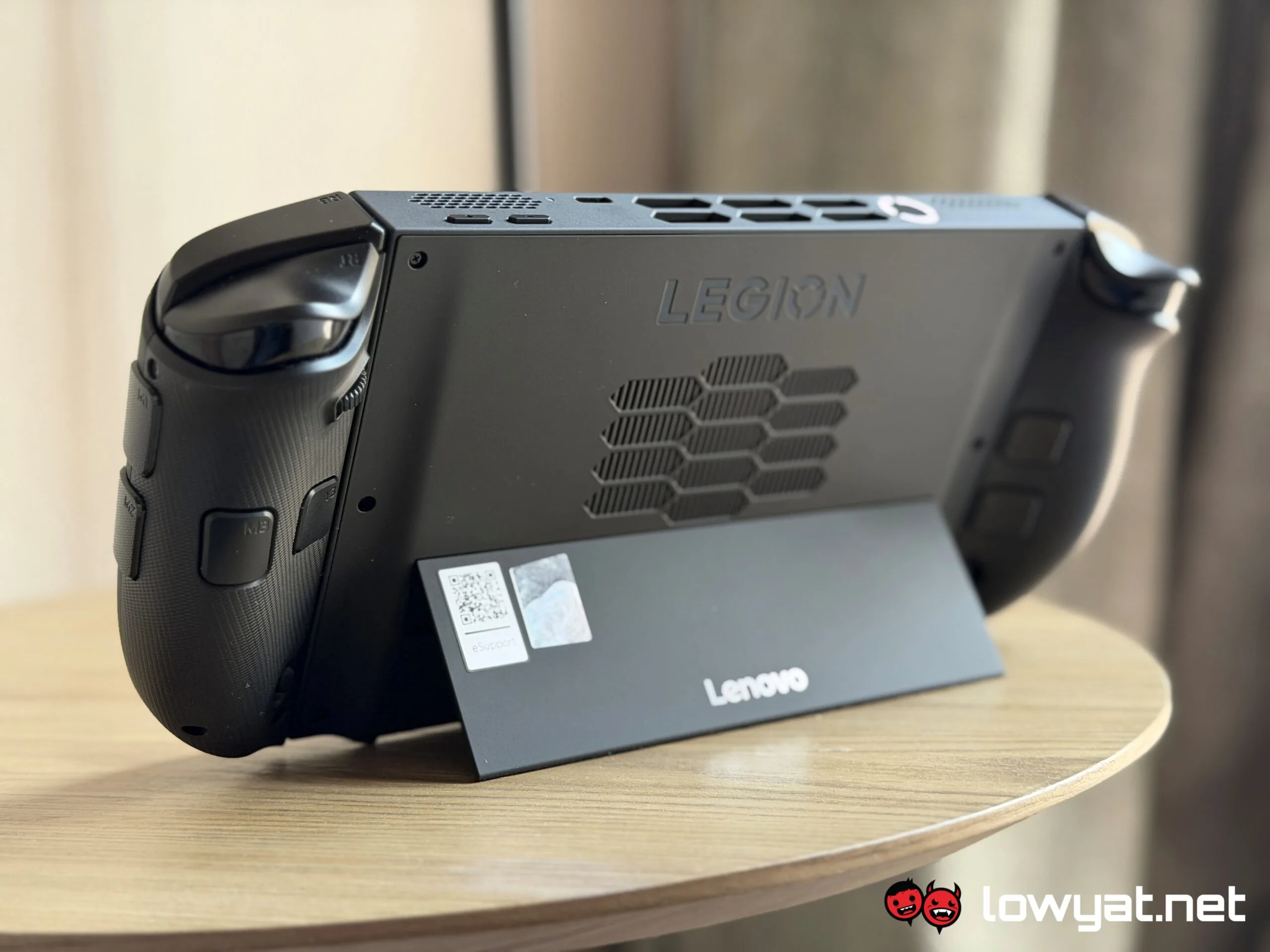
The shoulder buttons and triggers are perfectly fine, although there isn’t anything particularly remarkable about them. Meanwhile, the four rear buttons, with two on each controller, are useful for assigning macros and additional functions. There are also two extra buttons on the side of the right controller, although these are disabled by default and only become active when using FPS mode.
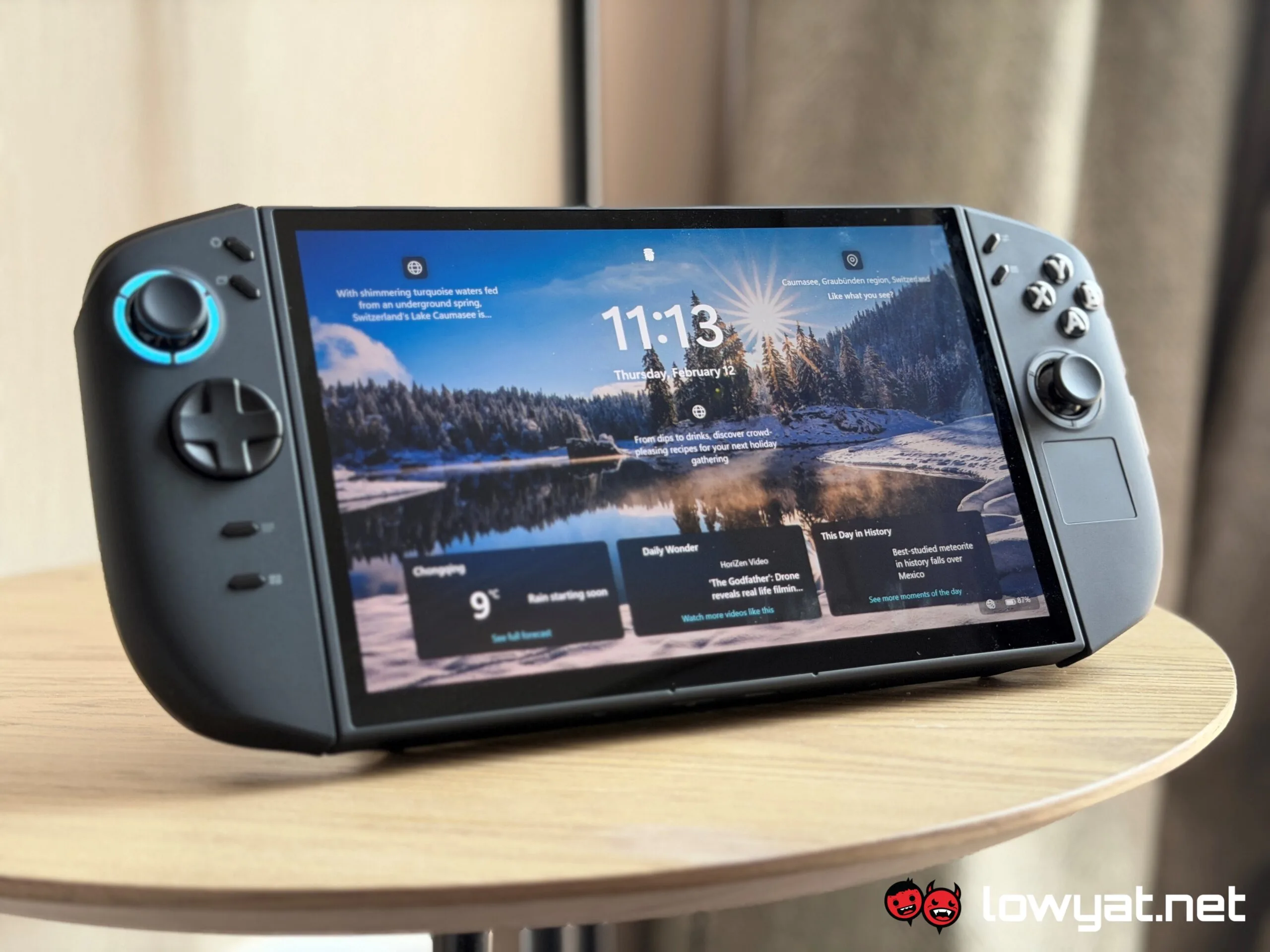
The right controller also packs two features that I particularly appreciate. The first is its touchpad, which is genuinely useful for navigating Windows 11 when you’re holding the Legion Go 2 with both hands and can’t conveniently reach for the touchscreen. The second is the wheel on its rear, which can be physically scrolled to navigate content such as web pages.

Thoughtful Hardware Refinements
Lenovo has also made several smaller changes to the main body that collectively improve the experience. The volume buttons and top USB-C port have been moved to the right-hand side, while the power button is now larger thanks to the addition of a fingerprint scanner.
That fingerprint scanner is a particularly welcome upgrade. Being able to unlock the Legion Go 2 with a quick touch is significantly faster and more convenient than having to enter a PIN or password every time.
Another sensible change is the relocation of the microSD card slot to the bottom of the device. This should help keep the card and reader away from the heat generated by the internal hardware, which is a much better position than on the original Legion Go.

The built-in kickstand remains one of my favourite features of both Legion Go models. Combined with the detachable controllers, it allows me to game without having to hold the entire device, much like using a Nintendo Switch or Switch 2 in tabletop mode.
You can even use the left and right controllers independently for two-player gaming, although this requires some initial configuration. You’ll need to re-pair each controller as an individual unit, which is a little tedious if you’re only planning to do it occasionally.
And then there’s FPS Mode, one of the features that continues to make the Legion Go series stand out from other handhelds. It turns the left controller into a traditional movement controller while reconfiguring the right controller into a mouse for aiming and camera controls. A physical toggle at the bottom of the right controller lets you activate or deactivate FPS Mode, preventing the reconfiguration from affecting its normal controller or handheld mode.

Legion Space Gets The Job Done
On the software side, Legion Space works well as a central hub for browsing the games and platforms installed on the Legion Go 2. It is also where you can customise performance and controller settings, as well as check for Lenovo’s first-party driver and BIOS updates.
The interface itself is pleasant and intuitive, which is important given how much functionality is packed into it. Meanwhile, the sidebar overlay can be summoned at any time through its dedicated button, providing quick access to various settings and shortcuts. It is straightforward enough to use without interrupting your gaming session, allowing you to change settings on the fly even while a game is running.

A Very Good OLED Display
The Legion Go 2’s display has a lower resolution than the original model, but the 8.8-inch panel still delivers crisp visuals. More importantly, the switch to OLED brings deeper blacks, better contrast and more vivid colours, making games look noticeably more pleasing.
The stereo speakers are fine, too. They are by no means cheap-sounding, but there isn’t anything particularly exciting to write home about either, as they essentially serve their purpose for personal gaming.
For the best audio experience, I’d still recommend using wireless headphones or earbuds. Those who prefer wired audio can use the included 3.5mm headphone jack, or one of the USB-C ports with a compatible audio device.

Performance Remains Excellent
Since the Legion Go 2 has been available for some time now, I’ll try to keep this section relatively brief. In short, the AMD Ryzen Z2 Extreme gives the handheld plenty of performance to play modern games, even the more recent ones, at respectable settings.
For newer titles, I generally use High graphics settings at 1600 x 1000 pixels resolution with borderless fullscreen enabled, while FSR is set to either Balanced or Performance depending on the game. With these settings, titles such as Crimson Desert, PRAGMATA, Monster Hunter Wilds and Tekken 8 can comfortably run at 50fps or above while still looking visually pleasing.


You can certainly push the settings higher, although a consistently smooth experience isn’t guaranteed once you start demanding more from the hardware. As of writing, I also haven’t encountered any compatibility issues, which suggests that both AMD and Lenovo have done a good job ensuring that games and Windows applications run properly on the Legion Go 2.
Heat management has improved as well. The larger vents at the top of the main body help with cooling, and even the screen doesn’t get particularly warm compared to its predecessor. Surprisingly, the built-in fan also remains relatively quiet even when running at higher speeds.

Better Battery Life
Battery life is another area where the Legion Go 2 improves upon its predecessor. I can generally get more than two hours of continuous gameplay from most titles, while less demanding games can push that figure to around five hours.
Interestingly, using the Legion Go 2 for non-gaming tasks can stretch the battery beyond nine hours. Of course, your mileage will vary depending on what you’re doing, but it’s nice to see that the device can last considerably longer when you’re not pushing its hardware to the limit.

A Makeshift Desktop PC
One somewhat unconventional way I’ve been using the Legion Go 2 is as a makeshift PC. Since it runs Windows 11, basic tasks such as word processing and even light video editing are entirely possible on the handheld.
You will, however, want a portable Bluetooth keyboard for this purpose because typing on the touchscreen isn’t particularly pleasant. Alternatively, you can connect a wired keyboard through a USB-C hub, which also gives you additional ports for thumb drives and other peripherals.

The Legion Go 2’s 8.8-inch display is actually usable for this sort of thing, too. It’s technically around the same size as an iPad mini, making it large enough for desktop websites and even some multi-tab browsing without feeling completely cramped.
You can take things a step further by connecting the Legion Go 2 to an external display through a USB-C hub with HDMI support. This can be useful if you need a larger screen or want to run a dual-display setup, although I’d reserve this option for situations where you really need it. At that point, you’re arguably defeating some of the appeal of having a portable PC in the first place.

What’s The Catch?
It’s Still A Big Handheld
Improved ergonomics aside, the Legion Go 2 is still a big and hefty handheld. It remains considerably larger and wider than most PC gaming handhelds, and even more so when compared to something like the Nintendo Switch 2.
The main body is also thicker than its predecessor, so this isn’t the device to get if compactness is high on your priority list. Its weight can become tiring during longer sessions as well, particularly when you’re playing without a table, armrest or other form of support.
FPS Mode is another feature that looks great on paper but takes some getting used to in practice. It can work well once you’ve adjusted to the unusual control scheme, but it still feels somewhat awkward compared to using the conventional mouse and keyboard combo.

Keep Your Expectations In Check
Performance is undoubtedly one of the Legion Go 2’s strengths, but it still can’t replace a full-fledged desktop gaming PC. If visual fidelity is your top priority, you’ll need to keep your expectations in check and accept that compromises will sometimes be necessary.
The same applies to battery life. Like virtually every gaming handheld on the market, you can’t expect high-end visuals and several hours of battery life at the same time when running demanding games unplugged.
If you’re planning to keep yourself entertained throughout a four-hour flight, for example, you’re better off sticking to less demanding games and indie titles. Alternatively, bring a power bank (not while on flights, of course) or make sure you have access to a power outlet.
And Then There’s The Price
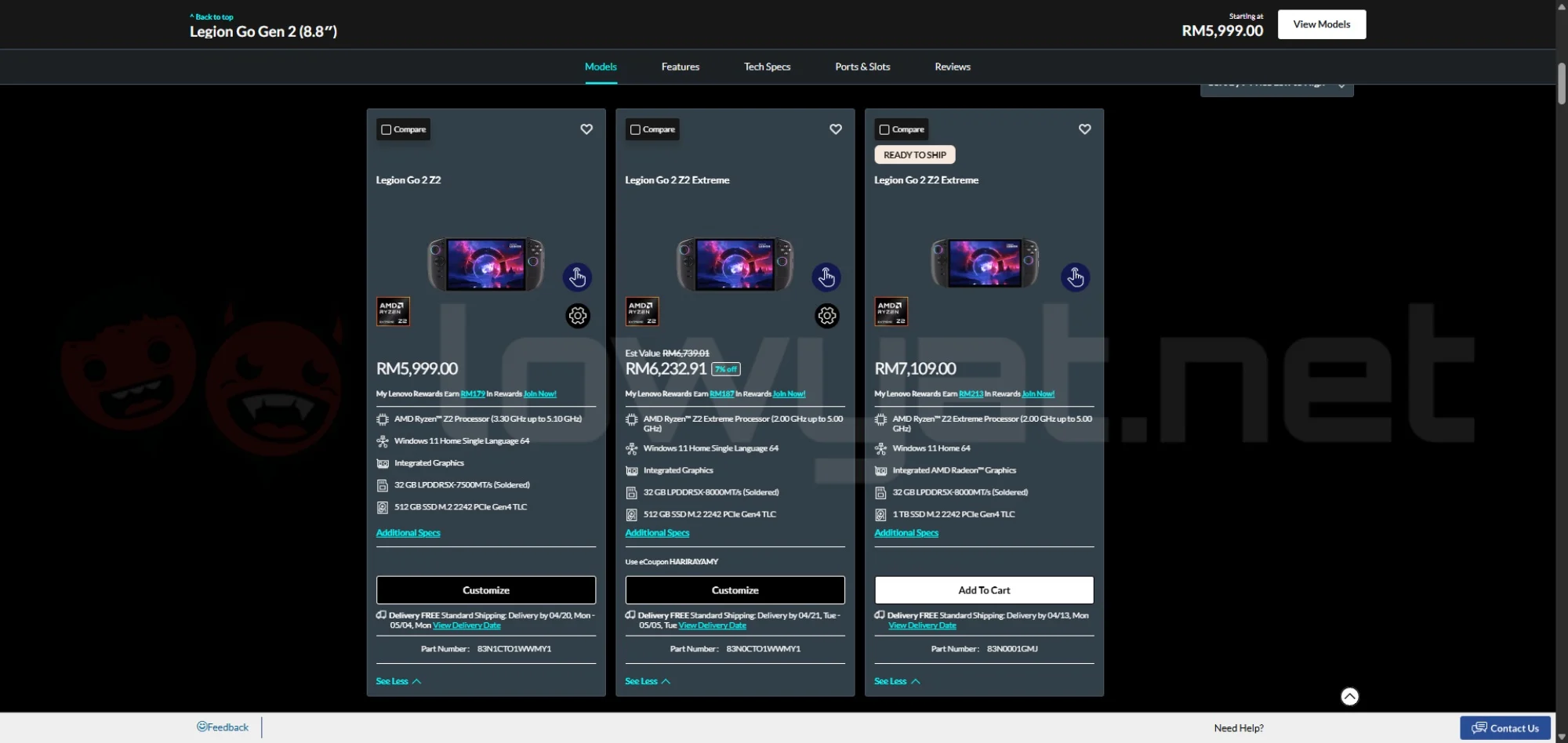
The biggest downside, however, is the Legion Go 2’s price. It was already an expensive proposition at launch, with the Z2 Extreme version starting at RM5,279, but the ongoing memory shortage has made the situation considerably worse.
At the time of writing, Lenovo’s second-generation handheld now starts at RM6,448. The 1TB version, meanwhile, has climbed to a staggering RM7,109.
Should I (Still) Buy It?
Let’s address the elephant in the room first: at its current price, you’re paying more than you should for the Legion Go 2. That alone would normally be enough for me to recommend against buying it.
However, there’s an unfortunate complication. Recent reports suggest that the ongoing memory shortage may not be resolved anytime soon, meaning prices could potentially rise even further. This creates an awkward situation where the question becomes less about whether the Legion Go 2 is worth its current price and more about whether you should buy it before it gets even more expensive.
My answer is simple: only if you’re financially comfortable with it. Things aren’t exactly ideal right now, and they may not improve for another year or two, or until the memory shortage is eventually resolved. We also can’t discount the possibility that newer handhelds, including a potential Legion Go successor, could end up costing even more.

If price isn’t an issue, however, I have no hesitation recommending the Legion Go 2. It is a portable gaming handheld that ticks almost all the right boxes for me, while its Windows 11 foundation gives it enough flexibility to double as a makeshift PC whenever I need one for non-gaming tasks.
Like its predecessor, the Legion Go 2 has also become an essential device for me to carry around when travelling. The price hike notwithstanding, I have yet to be disappointed by the second-gen Lenovo handheld during the months I’ve spent using it.